
Fake names
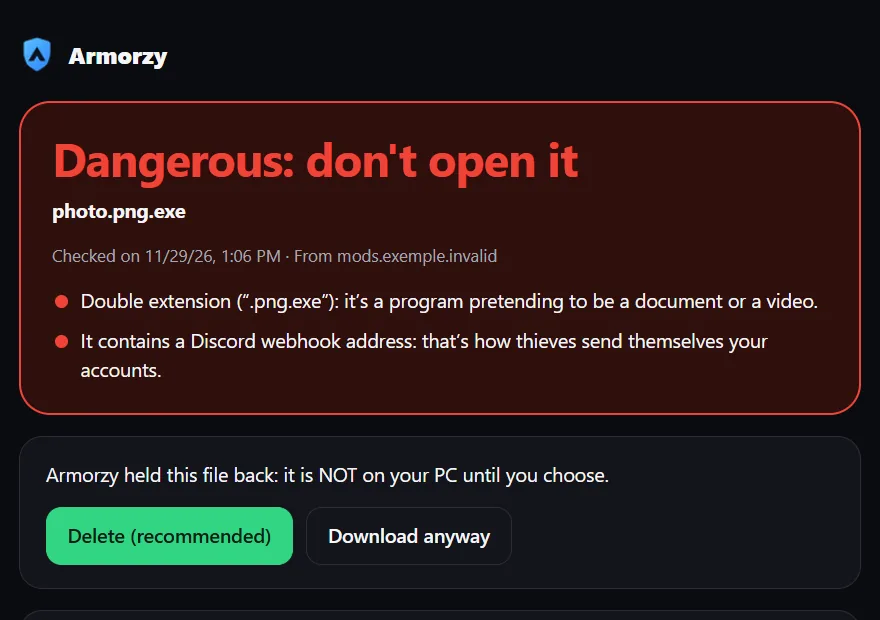
Double extension (“skin.png.exe”), names written backwards, known fake cheats (Solara, Krnl, Xeno…), a program hidden behind a fake file type.
Free · no sign-up · nothing is uploaded
Check it in 5 seconds: we look for the known traps used by account thieves. Free, and your file never leaves your device.
The website only sees the file, not your PC. For a full scan with Microsoft Defender and a check of your whole PC, the Armorzy app is coming to the Microsoft Store.
Double extension (“skin.png.exe”), names written backwards, known fake cheats (Solara, Krnl, Xeno…), a program hidden behind a fake file type.
We open ZIP archives and packed Python programs to read inside. We look for the addresses thieves use to send themselves your accounts (Discord, Telegram), your Discord login key, browser password decryption, known stealer names and scripts that download things in secret.
Password-protected archives the antivirus can’t open, files stuffed with filler so they’re too big to scan, files hiding their real type.
Extension for Chrome and Edge
The Armorzy extension checks the file before it lands on your PC. Everything happens on your device: nothing is sent.
Soon on the Chrome Web Store and Edge
No. The home page checker reads your file in your browser, on your device: it is never sent, and the site isn’t even allowed to connect anywhere else. Only exception, if you choose it: the “VirusTotal” link sends the file’s fingerprint (a unique code), never the file.
No. Green means we found no known trap. A brand-new virus can slip through: always get your files from the creator’s official site and keep Microsoft Defender on.
Don’t panic. From your phone, change your passwords, starting with your e-mail, then Discord, Epic, Steam. Sign out of all devices on your accounts. Then follow our “My PC was hacked” guide, step by step.
Follow our step-by-step guide: change your passwords from another device (your phone, for example), starting with your email, and sign out every device from your accounts. Armorzy's “I've been hacked” mode goes through these steps in order, but it does not recover any account for you: you take the steps yourself, on each service's official pages.
The free Armorzy app does the full check: a score out of 100, the settings to change, and what to do if your account gets stolen.